
Enterprise LLM Chatbot: RAG Architecture and Implementation
The first enterprise chatbot I built without RAG was a disaster. It was confident, articulate, and wrong — hallucinating policy details that did not exist, inventing return windows, citing documents it had never seen. The executives loved the demo; the legal team killed the project. That failure taught me something that no architecture diagram conveys: an LLM without grounding in your actual data is not an assistant; it is a liability.
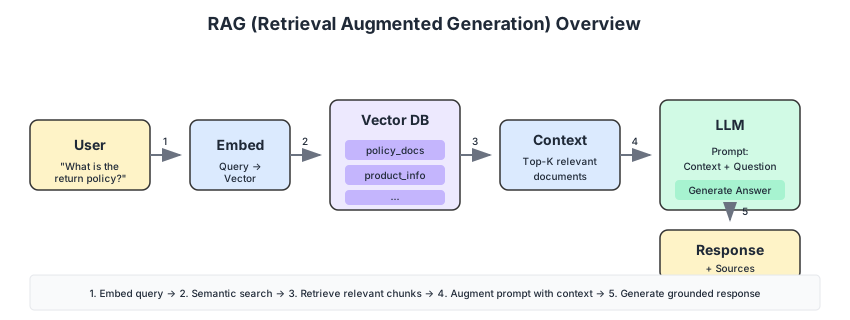
Retrieval Augmented Generation is the pattern that changed this. Instead of trusting the model’s parametric memory, you retrieve relevant documents first and feed them as context. The model generates from evidence rather than imagination. It is not a perfect solution — retrieval quality is the new bottleneck, and chunking strategy becomes the most consequential decision in the pipeline — but it is the difference between a chatbot you can deploy and one that stays in staging indefinitely.
Why RAG for Enterprise Chatbots?
Standard LLMs have fundamental limitations for enterprise use:
- Knowledge cutoff: Training data becomes stale
- Hallucinations: Models confidently generate incorrect information
- No private data: Cannot access proprietary enterprise knowledge
- Context limits: Cannot process entire document repositories
RAG addresses these by retrieving relevant context before generation:
| Approach | Knowledge Source | Accuracy | Privacy |
|---|---|---|---|
| Pure LLM | Training data only | Variable | Data exposed in training |
| Fine-tuning | Custom training | Good | Requires data sharing |
| RAG | Retrieved documents | High | Data stays on-premise |
Architecture Overview
The enterprise chatbot architecture consists of several layers:

Component Breakdown
Frontend Layer
- Client SPA (React/Angular)
- Admin interface for knowledge management
- Chat interface with conversation history
Backend Services
- Chat Service: Orchestrates RAG pipeline (Java/Spring Boot)
- Translation Service: Multi-language support (Python/Flask)
- Configuration Service: Dynamic LLM and chat settings
- File Service: Document ingestion and processing
AI/ML Layer
- Embedding Service: Vector generation (Hugging Face)
- LangChain: RAG orchestration and prompt management
- LLM Provider: Azure OpenAI / On-premise models
Data Layer
- Vector Database: Semantic search (Milvus/Qdrant/Weaviate)
- PostgreSQL: Conversations, configurations, user data
- Object Storage: Original documents
Infrastructure
- Kubernetes for orchestration
- Keycloak for authentication
- API Gateway for routing
RAG Pipeline Deep Dive
Document Ingestion
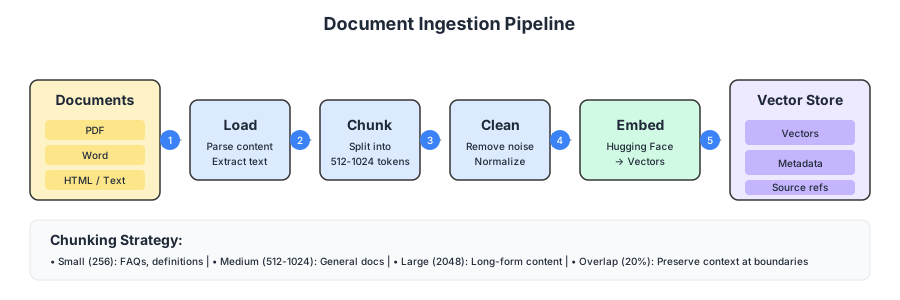
The ingestion pipeline prepares documents for semantic search:
from langchain.document_loaders import PyPDFLoader, UnstructuredWordLoader
from langchain.text_splitter import RecursiveCharacterTextSplitter
from langchain.embeddings import HuggingFaceEmbeddings

# 1. Load documents
def load_document(file_path: str):
    if file_path.endswith('.pdf'):
        loader = PyPDFLoader(file_path)
    elif file_path.endswith('.docx'):
        loader = UnstructuredWordLoader(file_path)
    return loader.load()

# 2. Split into chunks
text_splitter = RecursiveCharacterTextSplitter(
    chunk_size=1000,
    chunk_overlap=200,
    separators=["\n\n", "\n", ".", " "]
)

# 3. Generate embeddings
embeddings = HuggingFaceEmbeddings(
    model_name="sentence-transformers/all-MiniLM-L6-v2"
)

# 4. Store in vector database
def ingest_document(file_path: str, collection_name: str):
    documents = load_document(file_path)
    chunks = text_splitter.split_documents(documents)

    vectors = embeddings.embed_documents([c.page_content for c in chunks])

    # Store vectors with metadata
    vector_store.add(
        collection=collection_name,
        vectors=vectors,
        documents=[c.page_content for c in chunks],
        metadata=[{"source": file_path, "page": c.metadata.get("page")}
                  for c in chunks]
    )
Chunking Strategies
Chunking is where most RAG projects silently fail. Teams agonise over model selection and vector database benchmarks, then use a default chunk size of 1000 characters without testing whether it suits their document corpus. In my experience, the chunk size decision has more impact on answer quality than the choice of embedding model.
| Chunk Size | Pros | Cons | Best For |
|---|---|---|---|
| Small (256) | Precise retrieval | Loses context | FAQ, definitions |
| Medium (512-1024) | Balanced | General purpose | Most use cases |
| Large (2048+) | Full context | Retrieves irrelevant content | Long-form documents |
Overlap ensures context is not lost at boundaries:
# Without overlap: sentences cut mid-thought
# With 200 char overlap: context preserved

text_splitter = RecursiveCharacterTextSplitter(
    chunk_size=1000,
    chunk_overlap=200  # 20% overlap recommended
)
Query Processing
When a user asks a question:
from langchain.chains import RetrievalQA
from langchain.llms import AzureOpenAI

# 1. Embed the query
query = "What is the return policy for electronics?"
query_embedding = embeddings.embed_query(query)

# 2. Semantic search
relevant_chunks = vector_store.similarity_search(
    query_embedding,
    collection="product_policies",
    top_k=5,
    threshold=0.7
)

# 3. Build context
context = "\n\n".join([chunk.page_content for chunk in relevant_chunks])

# 4. Generate response with LLM
prompt = f"""Based on the following context, answer the question.
If the answer cannot be found in the context, say "I don't have information about that."

Context:
{context}

Question: {query}

Answer:"""

response = llm.generate(prompt)
Retrieval Strategies
Different retrieval approaches for different needs:
Semantic Search (Default)
# Cosine similarity between query and document embeddings
results = vector_store.similarity_search(query_embedding, top_k=5)
Hybrid Search (Semantic + Keyword)
# Combine vector similarity with BM25 keyword matching
semantic_results = vector_store.similarity_search(query_embedding)
keyword_results = bm25_search(query_text)
results = reciprocal_rank_fusion(semantic_results, keyword_results)
Multi-Query Retrieval
# Generate multiple query variations for better coverage
queries = llm.generate(f"Generate 3 variations of: {query}")
all_results = [vector_store.search(q) for q in queries]
results = deduplicate_and_rank(all_results)
LangChain Integration
LangChain provides the orchestration layer:
from langchain.chains import ConversationalRetrievalChain
from langchain.memory import ConversationBufferWindowMemory
from langchain.prompts import PromptTemplate

# Custom prompt template
prompt_template = PromptTemplate(
    input_variables=["context", "question", "chat_history"],
    template="""You are a helpful assistant for enterprise questions.
Use the following context to answer the question.
If you don't know the answer, say so - don't make up information.

Previous conversation:
{chat_history}

Context from knowledge base:
{context}

Question: {question}

Helpful answer:"""
)

# Conversation memory (last 5 exchanges)
memory = ConversationBufferWindowMemory(
    memory_key="chat_history",
    return_messages=True,
    k=5
)

# RAG chain
chain = ConversationalRetrievalChain.from_llm(
    llm=AzureOpenAI(deployment_name="gpt-4"),
    retriever=vector_store.as_retriever(search_kwargs={"k": 5}),
    memory=memory,
    combine_docs_chain_kwargs={"prompt": prompt_template},
    return_source_documents=True
)

# Query
result = chain({"question": "What are the working hours?"})
print(result["answer"])
print(result["source_documents"])  # Citations
Embedding Models
The embedding model is the lens through which your chatbot sees its knowledge base. Choose the wrong one and your retrieval will be semantically blind — returning chunks that share keywords but miss meaning. I have found that all-mpnet-base-v2 hits the best balance of quality and speed for most enterprise use cases, but the only honest answer is: test it against your data.
| Model | Dimensions | Speed | Quality | License |
|---|---|---|---|---|
| all-MiniLM-L6-v2 | 384 | Fast | Good | Apache 2.0 |
| all-mpnet-base-v2 | 768 | Medium | Better | Apache 2.0 |
| e5-large-v2 | 1024 | Slow | Best | MIT |
| OpenAI ada-002 | 1536 | API | Excellent | Commercial |
For on-premise deployment, Hugging Face models provide excellent quality without data leaving your infrastructure:
from sentence_transformers import SentenceTransformer

# Load model locally
model = SentenceTransformer('sentence-transformers/all-mpnet-base-v2')

# Generate embeddings
embeddings = model.encode(documents, show_progress_bar=True)
Scaling Embeddings
For high-throughput scenarios, deploy embedding models as a service:
# Kubernetes deployment for embedding service
apiVersion: apps/v1
kind: Deployment
metadata:
  name: embedding-service
spec:
  replicas: 3
  template:
    spec:
      containers:
        - name: embeddings
          image: huggingface/text-embeddings-inference:latest
          args:
            - --model-id=sentence-transformers/all-mpnet-base-v2
            - --max-batch-requests=32
          resources:
            limits:
              nvidia.com/gpu: 1
          ports:
            - containerPort: 8080
Vector Database Selection
The vector database market is noisy and moving fast. I will spare you the hype: for most projects, the choice comes down to operational complexity versus feature richness. Here are the common options for production:
| Database | Strengths | Considerations |
|---|---|---|
| Milvus | Scalable, feature-rich | Complex setup |
| Qdrant | Fast, easy API | Newer ecosystem |
| Weaviate | GraphQL, modules | Resource intensive |
| Chroma | Simple, embedded | Limited scale |
| pgvector | PostgreSQL native | Basic features |
Collection Design
Organize vectors by domain for better retrieval:
# Separate collections by document type
collections = {
    "hr_policies": {
        "description": "HR policies and procedures",
        "chunk_size": 512,
        "embedding_model": "all-mpnet-base-v2"
    },
    "product_docs": {
        "description": "Product documentation",
        "chunk_size": 1024,
        "embedding_model": "all-mpnet-base-v2"
    },
    "faq": {
        "description": "Frequently asked questions",
        "chunk_size": 256,
        "embedding_model": "all-MiniLM-L6-v2"  # Faster for short content
    }
}
LLM Provider Options
Cloud Providers
Azure OpenAI
from langchain.llms import AzureOpenAI

llm = AzureOpenAI(
    deployment_name="gpt-4",
    api_version="2024-02-15-preview",
    temperature=0.1,
    max_tokens=1000
)
AWS Bedrock
from langchain.llms import Bedrock

llm = Bedrock(
    model_id="anthropic.claude-3-sonnet",
    model_kwargs={"temperature": 0.1}
)
On-Premise Options
For data privacy requirements, run models locally:
Ollama
from langchain.llms import Ollama

llm = Ollama(
    model="llama3:70b",
    base_url="http://ollama-service:11434"
)
vLLM (High Performance)
# Kubernetes deployment for vLLM
apiVersion: apps/v1
kind: Deployment
metadata:
  name: vllm-server
spec:
  template:
    spec:
      containers:
        - name: vllm
          image: vllm/vllm-openai:latest
          args:
            - --model=meta-llama/Llama-3-70b-chat-hf
            - --tensor-parallel-size=4
          resources:
            limits:
              nvidia.com/gpu: 4
Chat Service Implementation
The Chat Service orchestrates the entire flow:
@Service
public class ChatService {

    private final VectorStoreClient vectorStore;
    private final LlmClient llmClient;
    private final ConversationRepository conversationRepo;

    public ChatResponse processMessage(ChatRequest request) {
        // 1. Load conversation history
        Conversation conversation = conversationRepo
            .findById(request.getConversationId())
            .orElseGet(Conversation::new);

        // 2. Retrieve relevant context
        List<Document> relevantDocs = vectorStore.search(
            request.getMessage(),
            request.getCollections(),
            5  // top_k
        );

        // 3. Build prompt with context
        String prompt = buildPrompt(
            request.getMessage(),
            relevantDocs,
            conversation.getHistory()
        );

        // 4. Generate response
        String response = llmClient.generate(prompt);

        // 5. Save to conversation history
        conversation.addMessage(request.getMessage(), response);
        conversationRepo.save(conversation);

        return ChatResponse.builder()
            .message(response)
            .sources(relevantDocs.stream()
                .map(Document::getSource)
                .collect(toList()))
            .conversationId(conversation.getId())
            .build();
    }
}
Security Considerations
Authentication Flow
Integrate with enterprise identity:
User → Chat UI → Keycloak → JWT → Chat Service → LLM
                    ↓
              Validate token
              Check permissions
              Log access
Data Protection
- Input Sanitization: Prevent prompt injection
def sanitize_input(user_input: str) -> str:
    # Remove potential injection patterns
    dangerous_patterns = [
        "ignore previous instructions",
        "disregard above",
        "system prompt"
    ]
    for pattern in dangerous_patterns:
        user_input = user_input.replace(pattern, "[FILTERED]")
    return user_input
- Output Filtering: Prevent data leakage
def filter_response(response: str, user_role: str) -> str:
    if user_role != "admin":
        # Redact sensitive patterns
        response = re.sub(r'\b\d{3}-\d{2}-\d{4}\b', '[REDACTED]', response)
    return response
- Audit Logging
@Aspect
@Component
public class ChatAuditAspect {

    @Around("@annotation(Audited)")
    public Object auditChat(ProceedingJoinPoint joinPoint) {
        ChatRequest request = (ChatRequest) joinPoint.getArgs()[0];

        auditLog.info("Chat request: user={}, message_hash={}, collections={}",
            SecurityContextHolder.getContext().getAuthentication().getName(),
            hashMessage(request.getMessage()),
            request.getCollections()
        );

        return joinPoint.proceed();
    }
}
Kubernetes Deployment
High Availability Architecture
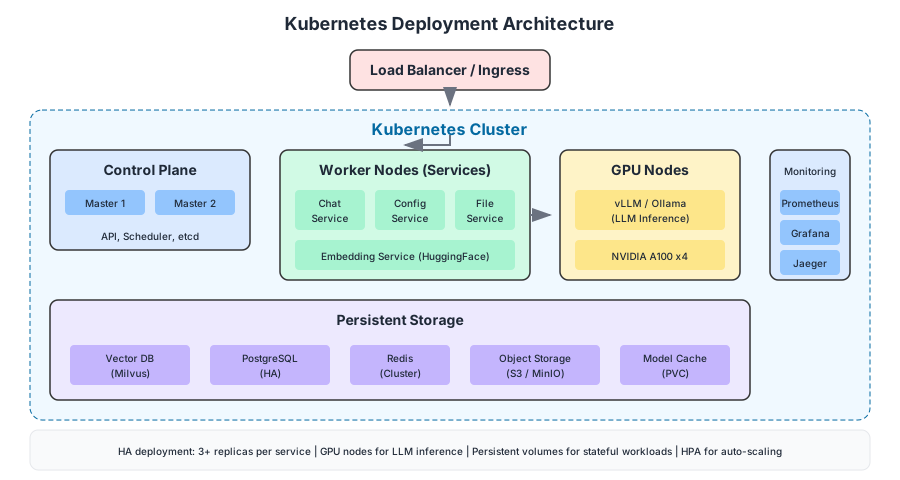
Deploy across multiple availability zones:
apiVersion: apps/v1
kind: Deployment
metadata:
  name: chat-service
spec:
  replicas: 3
  strategy:
    type: RollingUpdate
  template:
    spec:
      affinity:
        podAntiAffinity:
          requiredDuringSchedulingIgnoredDuringExecution:
            - labelSelector:
                matchLabels:
                  app: chat-service
              topologyKey: topology.kubernetes.io/zone
      containers:
        - name: chat-service
          image: chat-service:1.0.0
          resources:
            requests:
              memory: "2Gi"
              cpu: "1000m"
            limits:
              memory: "4Gi"
              cpu: "2000m"
          livenessProbe:
            httpGet:
              path: /actuator/health/liveness
              port: 8080
          readinessProbe:
            httpGet:
              path: /actuator/health/readiness
              port: 8080
GPU Scheduling for LLM
apiVersion: v1
kind: Pod
metadata:
  name: llm-inference
spec:
  containers:
    - name: vllm
      image: vllm/vllm-openai:latest
      resources:
        limits:
          nvidia.com/gpu: 4
      volumeMounts:
        - name: model-cache
          mountPath: /root/.cache/huggingface
  nodeSelector:
    accelerator: nvidia-a100
  tolerations:
    - key: nvidia.com/gpu
      operator: Exists
      effect: NoSchedule
Performance Optimisation
Caching Strategies
from functools import lru_cache
import redis

redis_client = redis.Redis(host='redis', port=6379)

# Cache embeddings for repeated queries
@lru_cache(maxsize=10000)
def get_embedding_cached(text: str) -> list:
    return embedding_model.encode(text).tolist()

# Cache LLM responses for identical queries + context
def get_cached_response(query_hash: str) -> Optional[str]:
    return redis_client.get(f"llm:response:{query_hash}")

def cache_response(query_hash: str, response: str, ttl: int = 3600):
    redis_client.setex(f"llm:response:{query_hash}", ttl, response)
Batching Requests
# Batch multiple embedding requests
async def batch_embed(texts: List[str], batch_size: int = 32):
    embeddings = []
    for i in range(0, len(texts), batch_size):
        batch = texts[i:i + batch_size]
        batch_embeddings = await embedding_service.embed_batch(batch)
        embeddings.extend(batch_embeddings)
    return embeddings
Monitoring and Observability
Key Metrics
| Metric | Description | Alert Threshold |
|---|---|---|
| Response latency (p95) | End-to-end time | > 5s |
| Retrieval quality | Relevance score | < 0.6 |
| LLM token usage | Tokens per request | Budget based |
| Cache hit rate | Embedding cache | < 50% |
| Error rate | Failed requests | > 1% |
Tracing with OpenTelemetry
from opentelemetry import trace
from opentelemetry.instrumentation.langchain import LangchainInstrumentor

# Instrument LangChain
LangchainInstrumentor().instrument()

tracer = trace.get_tracer(__name__)

@tracer.start_as_current_span("process_chat")
def process_chat(message: str):
    with tracer.start_as_current_span("retrieve_context"):
        context = retrieve_documents(message)

    with tracer.start_as_current_span("generate_response"):
        response = llm.generate(build_prompt(message, context))

    return response
Evaluation and Testing
RAG Quality Metrics
from ragas import evaluate
from ragas.metrics import faithfulness, answer_relevancy, context_recall

# Evaluate RAG pipeline
evaluation_data = {
    "question": ["What is the return policy?"],
    "answer": ["Items can be returned within 30 days..."],
    "contexts": [["Policy document excerpt..."]],
    "ground_truth": ["30-day return policy for all items"]
}

results = evaluate(
    evaluation_data,
    metrics=[faithfulness, answer_relevancy, context_recall]
)
print(results)
# faithfulness: 0.92
# answer_relevancy: 0.88
# context_recall: 0.95
Load Testing
# k6 load test script
import http from 'k6/http';
import { check, sleep } from 'k6';

export const options = {
  stages: [
    { duration: '2m', target: 50 },
    { duration: '5m', target: 100 },
    { duration: '2m', target: 0 },
  ],
};

export default function () {
  const response = http.post('http://chat-service/api/chat', {
    message: 'What are the working hours?',
    conversationId: 'test-conversation'
  });

  check(response, {
    'status is 200': (r) => r.status === 200,
    'response time < 5s': (r) => r.timings.duration < 5000,
  });

  sleep(1);
}
Reflection
Building this system taught me that the glamorous part of AI — the model, the generation, the conversational magic — is perhaps twenty per cent of the work. The other eighty per cent is plumbing: ingestion pipelines that handle malformed PDFs without crashing, chunking strategies tuned to your specific document corpus, embedding services that scale without bankrupting you, caching layers that prevent redundant LLM calls, and observability that tells you not just whether the system is working but how well it is answering.
RAG is not a silver bullet. Retrieval can miss. Context windows can overflow. Models can still hallucinate even with perfect context. But it is the architecture pattern that makes enterprise LLM deployment possible — that moves the conversation from “can we trust this?” to “how do we measure and improve this?” And that shift, from binary scepticism to iterative improvement, is where the real value begins.
Enterprise LLM Chatbot: RAG Architecture and Implementation
A guide to production-ready conversational AI.
Achraf SOLTANI — June 15, 2024