
Keycloak: Enterprise Identity and Access Management
Every developer, at some point in their career, builds a custom authentication system. I have done it myself — JWT generation, password hashing, session management, role checks scattered across middleware — and every time, the result was the same: a fragile, half-tested, undocumented identity layer that became the single largest source of security vulnerabilities in the application.
The lesson took longer to learn than it should have: authentication is not a feature to build; it is a problem to delegate. Keycloak is where I delegate it. It is open source, standards-based (OAuth 2.0, OpenID Connect, SAML 2.0), and mature enough that the edge cases I used to discover in production have already been encountered and resolved by someone else. What follows is a practical guide to its architecture, integration patterns, and the deployment decisions that matter.
Why Keycloak?
Traditional authentication approaches—session cookies, custom token implementations, LDAP direct binds—don’t scale to modern distributed architectures. Keycloak addresses this with:
- Standards-based: OAuth 2.0, OpenID Connect, SAML 2.0
- Single Sign-On: One login across all applications
- Identity Brokering: Federate with external identity providers
- Fine-grained Authorization: Role-based and attribute-based access control
- Self-service: User registration, password recovery, account management
- Enterprise Ready: High availability, clustering, multi-tenancy
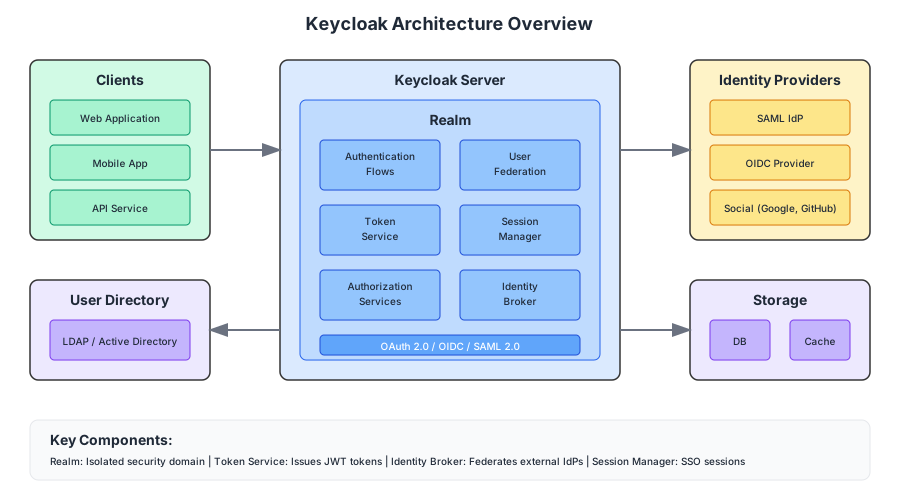
Core Concepts
Realms
A realm is a security domain managing a set of users, credentials, roles, and clients. Each realm is isolated—users in one realm cannot access another.
Master Realm (admin only)
├── Production Realm
│   ├── Users
│   ├── Clients (apps)
│   └── Identity Providers
├── Staging Realm
└── Development Realm
Best practice: Use separate realms for environments, not for tenants. I have seen teams create one realm per customer, and it becomes an operational nightmare — hundreds of realms, each with its own configuration drift, each requiring individual attention during upgrades. Multi-tenancy is better handled at the application level, with a single realm providing the identity layer and tenant scoping managed through custom claims or client roles.
Clients
A client is an application that requests authentication. Each client has:
- Client ID: Unique identifier
- Client Secret: For confidential clients
- Redirect URIs: Allowed callback URLs
- Protocol: OpenID Connect or SAML
Client types:
| Type | Description | Example |
|---|---|---|
| Confidential | Server-side apps that can keep secrets | Spring Boot backend |
| Public | Client-side apps that cannot keep secrets | React SPA, mobile app |
| Bearer-only | APIs that only validate tokens | REST microservice |
Users and Roles
Users can be:
- Created directly in Keycloak
- Imported from LDAP/Active Directory
- Federated from external identity providers
Roles provide authorization:
Realm Roles (global)
├── admin
├── user
└── auditor

Client Roles (app-specific)
├── order-service
│   ├── create-order
│   └── view-orders
└── inventory-service
    ├── manage-stock
    └── view-inventory
Identity Brokering
Keycloak can delegate authentication to external identity providers:
- Social: Google, Facebook, GitHub, Apple
- Enterprise: SAML IdPs, OIDC providers
- Corporate: Active Directory, LDAP
User → Keycloak → External IdP → Keycloak → Application
                      ↓
               (Authentication)
OAuth 2.0 and OpenID Connect
Keycloak implements OAuth 2.0 for authorization and OpenID Connect (OIDC) for authentication.
Authorization Code Flow
The most secure flow for server-side applications:
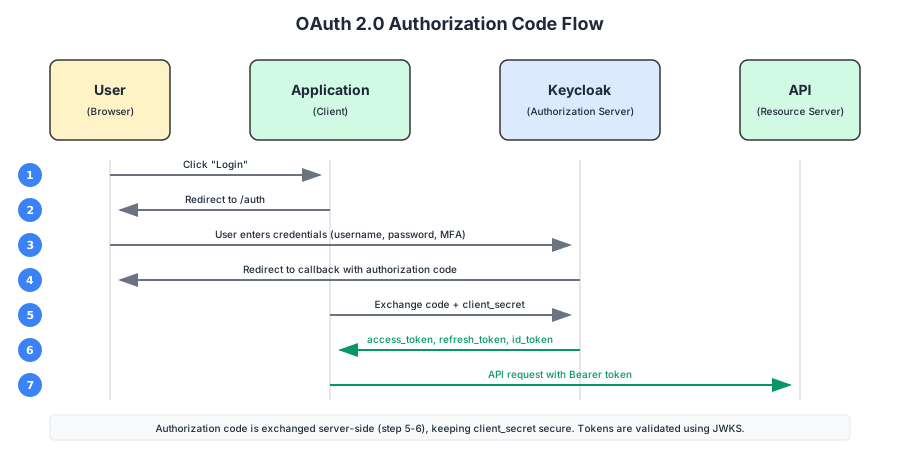
1. User clicks "Login"
2. App redirects to Keycloak /auth endpoint
3. User authenticates (username/password, MFA, etc.)
4. Keycloak redirects back with authorization code
5. App exchanges code for tokens (server-side)
6. App receives access_token, refresh_token, id_token
Implementation (Spring Boot):
# application.yml
spring:
  security:
    oauth2:
      client:
        registration:
          keycloak:
            client-id: my-app
            client-secret: ${KEYCLOAK_SECRET}
            scope: openid,profile,email
        provider:
          keycloak:
            issuer-uri: https://auth.example.com/realms/production
Authorization Code with PKCE
For public clients (SPAs, mobile apps), PKCE prevents authorization code interception:
// Generate PKCE challenge
const codeVerifier = generateRandomString(64);
const codeChallenge = await sha256(codeVerifier);

// Authorization request includes challenge
const authUrl = `${keycloakUrl}/auth?
  response_type=code&
  client_id=spa-app&
  code_challenge=${codeChallenge}&
  code_challenge_method=S256&
  redirect_uri=${redirectUri}`;

// Token exchange includes verifier
const tokenResponse = await fetch(`${keycloakUrl}/token`, {
  method: 'POST',
  body: new URLSearchParams({
    grant_type: 'authorization_code',
    code: authorizationCode,
    code_verifier: codeVerifier,
    client_id: 'spa-app',
    redirect_uri: redirectUri
  })
});
Client Credentials Flow
For service-to-service authentication (no user involved):
curl -X POST "https://auth.example.com/realms/production/protocol/openid-connect/token" \
  -d "grant_type=client_credentials" \
  -d "client_id=backend-service" \
  -d "client_secret=${CLIENT_SECRET}"
Response:
{
  "access_token": "eyJhbGciOiJSUzI1NiIsInR5cCI6IkpXVCJ9...",
  "expires_in": 300,
  "token_type": "Bearer"
}
Token Structure
Keycloak issues JWTs (JSON Web Tokens) containing claims:
{
  "exp": 1699999999,
  "iat": 1699999000,
  "jti": "unique-token-id",
  "iss": "https://auth.example.com/realms/production",
  "sub": "user-uuid",
  "typ": "Bearer",
  "azp": "my-app",
  "scope": "openid profile email",
  "realm_access": {
    "roles": ["user", "admin"]
  },
  "resource_access": {
    "order-service": {
      "roles": ["create-order", "view-orders"]
    }
  },
  "name": "John Doe",
  "email": "[email protected]"
}
Token Validation
APIs must validate tokens before processing requests:
@Configuration
@EnableWebSecurity
public class SecurityConfig {

    @Bean
    public SecurityFilterChain filterChain(HttpSecurity http) throws Exception {
        http
            .authorizeHttpRequests(auth -> auth
                .requestMatchers("/api/public/**").permitAll()
                .requestMatchers("/api/admin/**").hasRole("admin")
                .anyRequest().authenticated()
            )
            .oauth2ResourceServer(oauth2 -> oauth2
                .jwt(jwt -> jwt
                    .jwtAuthenticationConverter(jwtAuthConverter())
                )
            );
        return http.build();
    }

    private JwtAuthenticationConverter jwtAuthConverter() {
        JwtGrantedAuthoritiesConverter converter = new JwtGrantedAuthoritiesConverter();
        converter.setAuthoritiesClaimName("realm_access.roles");
        converter.setAuthorityPrefix("ROLE_");

        JwtAuthenticationConverter jwtConverter = new JwtAuthenticationConverter();
        jwtConverter.setJwtGrantedAuthoritiesConverter(converter);
        return jwtConverter;
    }
}
Integration Patterns
Pattern 1: API Gateway Integration
Centralize authentication at the gateway level:
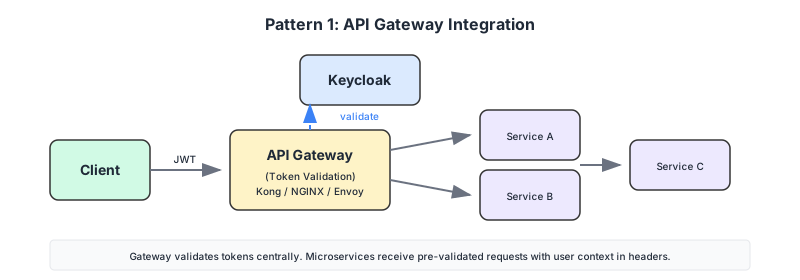
The gateway validates tokens and forwards requests with user context (headers or propagated JWT).
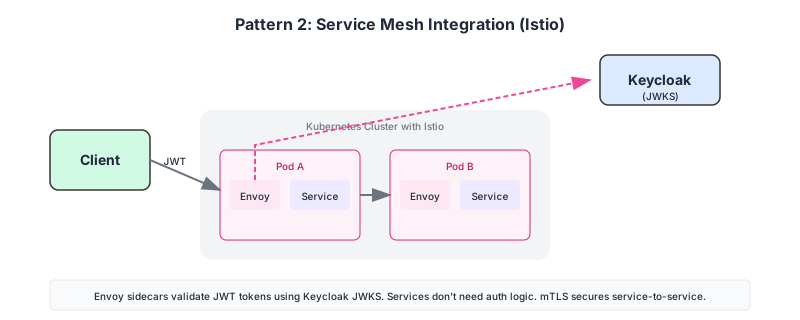
Pattern 2: Service Mesh Integration
With Istio or similar, authentication happens at the sidecar:
# Istio RequestAuthentication
apiVersion: security.istio.io/v1beta1
kind: RequestAuthentication
metadata:
  name: keycloak-auth
spec:
  jwtRules:
    - issuer: "https://auth.example.com/realms/production"
      jwksUri: "https://auth.example.com/realms/production/protocol/openid-connect/certs"
Pattern 3: Direct Integration
Each service validates tokens independently:
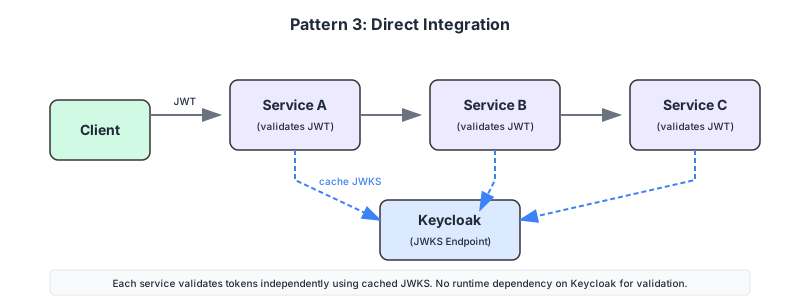
Services cache the JWKS (public keys) and validate tokens locally without calling Keycloak for every request.
Single Sign-On Federation
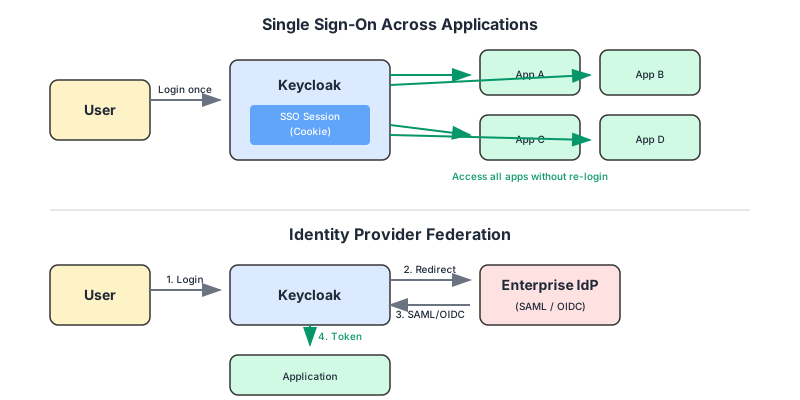
SSO Across Applications
Once authenticated with Keycloak, users access all applications without re-authenticating. The session cookie stored by Keycloak enables seamless access to all connected applications.
Identity Provider Federation
Federate with enterprise identity providers. Keycloak acts as a broker, redirecting users to their corporate IdP for authentication and mapping the response back to the application.
Configuration for SAML IdP:
{
  "alias": "corporate-saml",
  "providerId": "saml",
  "enabled": true,
  "config": {
    "entityId": "https://auth.example.com/realms/production",
    "singleSignOnServiceUrl": "https://idp.corporate.com/sso",
    "nameIDPolicyFormat": "urn:oasis:names:tc:SAML:1.1:nameid-format:emailAddress",
    "signatureAlgorithm": "RSA_SHA256"
  }
}
User Federation
LDAP/Active Directory Integration
Synchronize users from corporate directories:
{
  "name": "corporate-ldap",
  "providerId": "ldap",
  "config": {
    "connectionUrl": "ldaps://ldap.corporate.com:636",
    "usersDn": "ou=users,dc=corporate,dc=com",
    "userObjectClasses": "inetOrgPerson, organizationalPerson",
    "usernameAttribute": "uid",
    "rdnAttribute": "uid",
    "uuidAttribute": "entryUUID",
    "bindDn": "cn=admin,dc=corporate,dc=com",
    "bindCredential": "${LDAP_PASSWORD}"
  }
}
Sync modes:
| Mode | Description |
|---|---|
| Import | Copy users to Keycloak database |
| Read-only | Query LDAP on demand |
| Writable | Sync changes back to LDAP |
High Availability Deployment
Clustered Architecture
                    ┌──────────────────┐
                    │   Load Balancer  │
                    └────────┬─────────┘
              ┌──────────────┼──────────────┐
              ▼              ▼              ▼
        ┌──────────┐  ┌──────────┐  ┌──────────┐
        │Keycloak 1│  │Keycloak 2│  │Keycloak 3│
        └────┬─────┘  └────┬─────┘  └────┬─────┘
             │             │             │
             └─────────────┼─────────────┘
                           ▼
              ┌────────────────────────┐
              │   Infinispan Cluster   │
              │   (Session Cache)      │
              └────────────┬───────────┘
                           ▼
              ┌────────────────────────┐
              │   PostgreSQL (HA)      │
              │   (User/Config Data)   │
              └────────────────────────┘
Kubernetes Deployment
apiVersion: apps/v1
kind: Deployment
metadata:
  name: keycloak
spec:
  replicas: 3
  template:
    spec:
      containers:
        - name: keycloak
          image: quay.io/keycloak/keycloak:23.0
          args: ["start"]
          env:
            - name: KC_DB
              value: postgres
            - name: KC_DB_URL
              value: jdbc:postgresql://postgres:5432/keycloak
            - name: KC_CACHE
              value: ispn
            - name: KC_CACHE_STACK
              value: kubernetes
            - name: KC_HOSTNAME
              value: auth.example.com
          ports:
            - containerPort: 8080
Security Hardening
Recommended Settings
# Disable HTTP, enforce HTTPS
KC_HTTP_ENABLED=false
KC_HTTPS_CERTIFICATE_FILE=/certs/tls.crt
KC_HTTPS_CERTIFICATE_KEY_FILE=/certs/tls.key

# Strict hostname checking
KC_HOSTNAME_STRICT=true
KC_HOSTNAME=auth.example.com

# Session security
KC_SPI_STICKY_SESSION_ENCODER_INFINISPAN_SHOULD_ATTACH_ROUTE=false
Brute Force Protection
Enable in realm settings:
| Setting | Recommended Value |
|---|---|
| Max login failures | 5 |
| Wait increment | 60 seconds |
| Max wait | 15 minutes |
| Failure reset time | 12 hours |
Token Security
{
  "accessTokenLifespan": 300,
  "refreshTokenLifespan": 1800,
  "ssoSessionIdleTimeout": 1800,
  "ssoSessionMaxLifespan": 36000,
  "accessTokenLifespanForImplicitFlow": 300
}
Monitoring and Operations
Key Metrics
| Metric | Description | Alert Threshold |
|---|---|---|
| Login success rate | % successful authentications | < 95% |
| Token validation latency | Time to validate JWT | > 50ms |
| Active sessions | Concurrent user sessions | Capacity based |
| Failed logins | Authentication failures | Anomaly based |
Health Endpoints
# Readiness (can accept traffic)
curl https://auth.example.com/health/ready

# Liveness (process is running)
curl https://auth.example.com/health/live

# Metrics (Prometheus format)
curl https://auth.example.com/metrics
Migration Considerations
From Legacy Systems
When migrating from custom authentication:
- Parallel run: Both systems active during transition
- User migration: Bulk import or lazy migration on first login
- Password handling: Hash migration or force password reset
- Session handling: Plan for session invalidation at cutover
Version Upgrades
Keycloak upgrade checklist:
□ Review release notes for breaking changes
□ Backup database
□ Test upgrade in staging environment
□ Update client adapters/libraries
□ Plan maintenance window
□ Execute upgrade with rollback plan ready
□ Validate authentication flows post-upgrade
Final Thoughts
Keycloak is not without its frustrations. The admin console can be opaque, the documentation occasionally lags behind releases, and the upgrade path from major version to major version requires genuine planning. But these are the complaints of a tool that I continue to use in every project, because the alternative — building it yourself — is categorically worse.
The single most important lesson I have learned from deploying Keycloak across multiple projects is this: invest the time upfront in realm design, client configuration, and federation strategy. Getting these right at the start is straightforward; fixing them after hundreds of users are in production is a migration project. Start with standards, design your realms for environments not tenants, plan your LDAP and IdP federation early, and deploy for high availability from day one. Authentication is the one system that absolutely cannot go down.
For organisations requiring commercial support and extended maintenance cycles, Red Hat build of Keycloak provides the same capabilities with enterprise backing.
Keycloak: Enterprise Identity and Access Management
A guide to modern authentication and authorization.
Achraf SOLTANI — May 10, 2024