
Kubernetes and Helm: Enterprise Deployment Architecture
Kubernetes promised declarative infrastructure: describe what you want, and the system converges toward it. In practice, the gap between that promise and reality is filled with YAML — mountains of it, duplicated across environments, drifting between what Git says and what the cluster actually runs. Helm and GitOps exist to close that gap, and in my experience, they are the difference between a Kubernetes deployment that scales to dozens of services and one that collapses under its own configuration weight.
What follows is the architecture I have converged on after deploying Kubernetes across multiple projects: Helm for packaging and parameterisation, ArgoCD for GitOps-driven delivery, and a set of patterns for high availability, security, and observability that have survived contact with production.
Kubernetes Architecture Fundamentals
Before reaching for Helm charts and GitOps pipelines, it is worth grounding ourselves in what Kubernetes actually is — because I have met too many engineers who can write a Deployment manifest but cannot explain what etcd does or why the scheduler matters.
Control Plane Components
The control plane manages the cluster state and makes scheduling decisions:
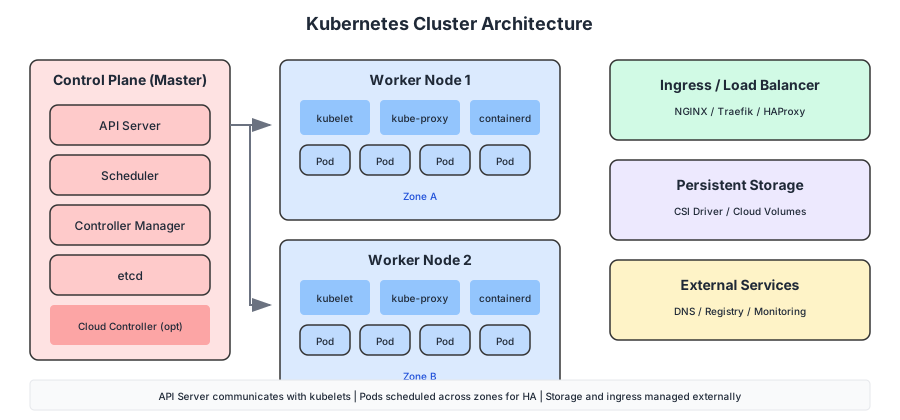
| Component | Responsibility |
|---|---|
| API Server | REST API, authentication, admission control |
| Scheduler | Pod placement decisions based on resources and constraints |
| Controller Manager | Runs controllers (ReplicaSet, Deployment, etc.) |
| etcd | Distributed key-value store for cluster state |
Worker Node Components
Each worker node runs the workloads:
| Component | Responsibility |
|---|---|
| Kubelet | Ensures containers are running in pods |
| Container Runtime | Runs containers (containerd, CRI-O) |
| Kube-proxy | Network proxy, implements Service abstraction |
Cluster Topology
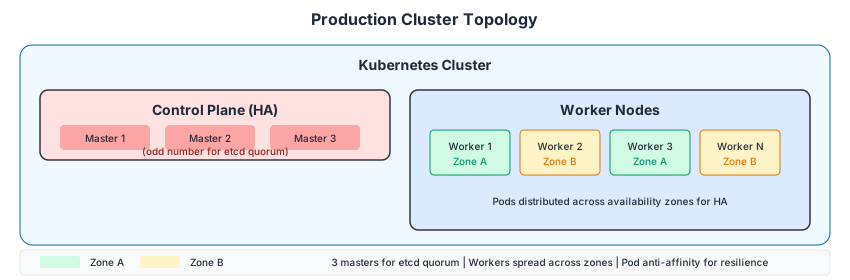
Production clusters typically span multiple availability zones:
Helm: Taming the YAML
Helm simplifies Kubernetes deployments by packaging related resources into charts. If you have ever copied a set of YAML files from one environment to another and manually changed the image tag, the replica count, and the ingress hostname — then forgotten one of them and spent an hour debugging — you already understand why Helm exists.
Why Helm?
Without Helm, deploying an application requires managing multiple YAML files:
# Without Helm - managing individual resources
kubectl apply -f deployment.yaml
kubectl apply -f service.yaml
kubectl apply -f configmap.yaml
kubectl apply -f secret.yaml
kubectl apply -f ingress.yaml
# Repeat for each environment with different values...
With Helm:
# With Helm - single command, parameterized
helm install my-app ./my-chart --values production.yaml
Helm Architecture
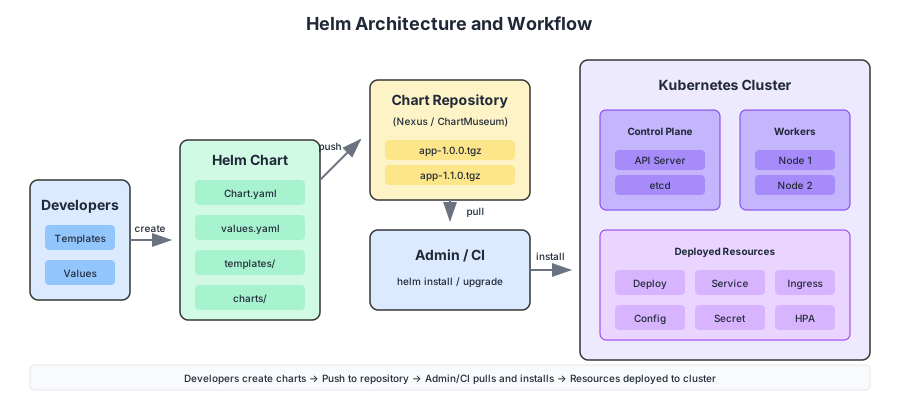
Key Concepts:
| Concept | Description |
|---|---|
| Chart | Package containing Kubernetes resource templates |
| Release | Instance of a chart deployed to a cluster |
| Repository | Collection of charts (like npm registry) |
| Values | Configuration parameters for customization |
Chart Structure
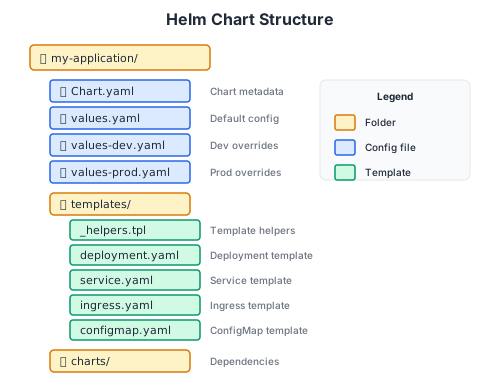
Chart.yaml
apiVersion: v2
name: my-application
description: A Helm chart for My Application
type: application
version: 1.2.0        # Chart version
appVersion: "2.1.0"   # Application version

dependencies:
  - name: postgresql
    version: "12.x.x"
    repository: https://charts.bitnami.com/bitnami
    condition: postgresql.enabled
Values and Templating
values.yaml - Default configuration:
replicaCount: 2

image:
  repository: my-registry.example.com/my-app
  tag: "latest"
  pullPolicy: IfNotPresent

service:
  type: ClusterIP
  port: 8080

ingress:
  enabled: true
  className: nginx
  hosts:
    - host: app.example.com
      paths:
        - path: /
          pathType: Prefix

resources:
  requests:
    cpu: 100m
    memory: 256Mi
  limits:
    cpu: 500m
    memory: 512Mi

autoscaling:
  enabled: true
  minReplicas: 2
  maxReplicas: 10
  targetCPUUtilization: 80

postgresql:
  enabled: true
  auth:
    database: myapp
templates/deployment.yaml - Using Go templating:
apiVersion: apps/v1
kind: Deployment
metadata:
  name: {{ include "my-application.fullname" . }}
  labels:
    {{- include "my-application.labels" . | nindent 4 }}
spec:
  {{- if not .Values.autoscaling.enabled }}
  replicas: {{ .Values.replicaCount }}
  {{- end }}
  selector:
    matchLabels:
      {{- include "my-application.selectorLabels" . | nindent 6 }}
  template:
    metadata:
      labels:
        {{- include "my-application.selectorLabels" . | nindent 8 }}
      annotations:
        checksum/config: {{ include (print $.Template.BasePath "/configmap.yaml") . | sha256sum }}
    spec:
      containers:
        - name: {{ .Chart.Name }}
          image: "{{ .Values.image.repository }}:{{ .Values.image.tag }}"
          imagePullPolicy: {{ .Values.image.pullPolicy }}
          ports:
            - name: http
              containerPort: {{ .Values.service.port }}
          livenessProbe:
            httpGet:
              path: /health/live
              port: http
            initialDelaySeconds: 30
          readinessProbe:
            httpGet:
              path: /health/ready
              port: http
          resources:
            {{- toYaml .Values.resources | nindent 12 }}
          envFrom:
            - configMapRef:
                name: {{ include "my-application.fullname" . }}-config
            - secretRef:
                name: {{ include "my-application.fullname" . }}-secret
Environment-Specific Values
values-dev.yaml:
replicaCount: 1

ingress:
  hosts:
    - host: app-dev.example.com

resources:
  requests:
    cpu: 50m
    memory: 128Mi
  limits:
    cpu: 200m
    memory: 256Mi

autoscaling:
  enabled: false
values-prod.yaml:
replicaCount: 3

ingress:
  hosts:
    - host: app.example.com
  tls:
    - secretName: app-tls
      hosts:
        - app.example.com

resources:
  requests:
    cpu: 500m
    memory: 1Gi
  limits:
    cpu: 2000m
    memory: 2Gi

autoscaling:
  enabled: true
  minReplicas: 3
  maxReplicas: 20
CI/CD Integration
GitLab CI/CD Pipeline
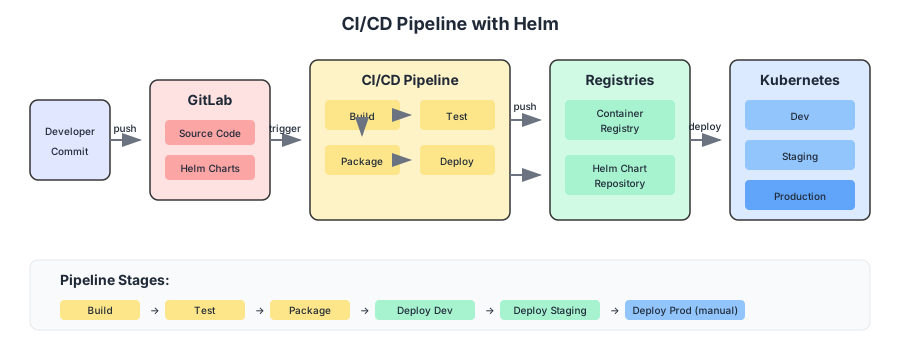
.gitlab-ci.yml:
stages:
  - build
  - test
  - package
  - deploy

variables:
  REGISTRY: registry.example.com
  IMAGE_NAME: $REGISTRY/my-app
  HELM_REPO: https://charts.example.com

build:
  stage: build
  image: docker:24
  services:
    - docker:24-dind
  script:
    - docker build -t $IMAGE_NAME:$CI_COMMIT_SHA .
    - docker push $IMAGE_NAME:$CI_COMMIT_SHA
  only:
    - main
    - develop

test:
  stage: test
  image: $IMAGE_NAME:$CI_COMMIT_SHA
  script:
    - npm test
  only:
    - main
    - develop

package-helm:
  stage: package
  image: alpine/helm:3.14
  script:
    - helm lint ./charts/my-app
    - helm package ./charts/my-app --version $CI_COMMIT_SHA
    - curl --data-binary "@my-app-$CI_COMMIT_SHA.tgz" $HELM_REPO/api/charts
  only:
    - main

deploy-dev:
  stage: deploy
  image: alpine/helm:3.14
  environment:
    name: development
    url: https://app-dev.example.com
  script:
    - helm upgrade --install my-app ./charts/my-app
        --namespace dev
        --values ./charts/my-app/values-dev.yaml
        --set image.tag=$CI_COMMIT_SHA
        --wait
  only:
    - develop

deploy-prod:
  stage: deploy
  image: alpine/helm:3.14
  environment:
    name: production
    url: https://app.example.com
  script:
    - helm upgrade --install my-app ./charts/my-app
        --namespace prod
        --values ./charts/my-app/values-prod.yaml
        --set image.tag=$CI_COMMIT_SHA
        --wait
  only:
    - main
  when: manual
Helm Repository Setup
Host charts in a repository for team access:
Using Nexus Repository:
# Add Helm repository
helm repo add mycompany https://nexus.example.com/repository/helm-hosted/
helm repo update

# Push chart to repository
curl -u admin:password https://nexus.example.com/repository/helm-hosted/ \
  --upload-file my-app-1.0.0.tgz
Using ChartMuseum:
# Deploy ChartMuseum
helm install chartmuseum chartmuseum/chartmuseum \
  --set persistence.enabled=true \
  --set persistence.size=10Gi

# Push chart
curl --data-binary "@my-app-1.0.0.tgz" http://chartmuseum.example.com/api/charts
GitOps with ArgoCD
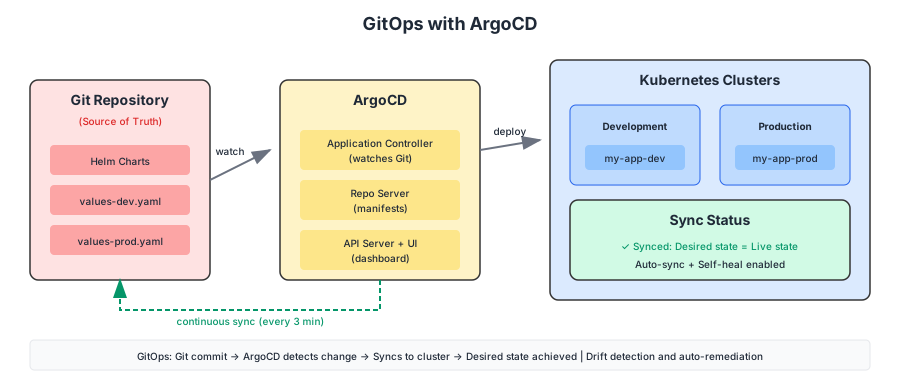
The fundamental problem with helm upgrade in a CI pipeline is that the pipeline knows what it deployed, but nobody knows what the cluster is. Drift accumulates — a manual kubectl edit here, a hotfix applied directly there — and eventually Git and the cluster disagree. ArgoCD solves this by inverting the flow: Git is the source of truth, and the cluster continuously reconciles toward it.
ArgoCD Architecture
Installing ArgoCD
# Create namespace
kubectl create namespace argocd

# Install ArgoCD
kubectl apply -n argocd -f https://raw.githubusercontent.com/argoproj/argo-cd/stable/manifests/install.yaml

# Access UI
kubectl port-forward svc/argocd-server -n argocd 8080:443

# Get initial admin password
kubectl -n argocd get secret argocd-initial-admin-secret -o jsonpath="{.data.password}" | base64 -d
Application Definition
apiVersion: argoproj.io/v1alpha1
kind: Application
metadata:
  name: my-application
  namespace: argocd
spec:
  project: default
  source:
    repoURL: https://gitlab.example.com/team/my-app.git
    targetRevision: main
    path: charts/my-app
    helm:
      valueFiles:
        - values-prod.yaml
      parameters:
        - name: image.tag
          value: "v2.1.0"
  destination:
    server: https://kubernetes.default.svc
    namespace: production
  syncPolicy:
    automated:
      prune: true
      selfHeal: true
    syncOptions:
      - CreateNamespace=true
ApplicationSet for Multi-Environment
apiVersion: argoproj.io/v1alpha1
kind: ApplicationSet
metadata:
  name: my-application-set
  namespace: argocd
spec:
  generators:
    - list:
        elements:
          - env: dev
            namespace: development
            values: values-dev.yaml
          - env: staging
            namespace: staging
            values: values-staging.yaml
          - env: prod
            namespace: production
            values: values-prod.yaml
  template:
    metadata:
      name: 'my-app-{{env}}'
    spec:
      project: default
      source:
        repoURL: https://gitlab.example.com/team/my-app.git
        targetRevision: main
        path: charts/my-app
        helm:
          valueFiles:
            - '{{values}}'
      destination:
        server: https://kubernetes.default.svc
        namespace: '{{namespace}}'
      syncPolicy:
        automated:
          prune: true
          selfHeal: true
Multi-Environment Deployment
Environment Separation
Separate environments using namespaces or clusters:
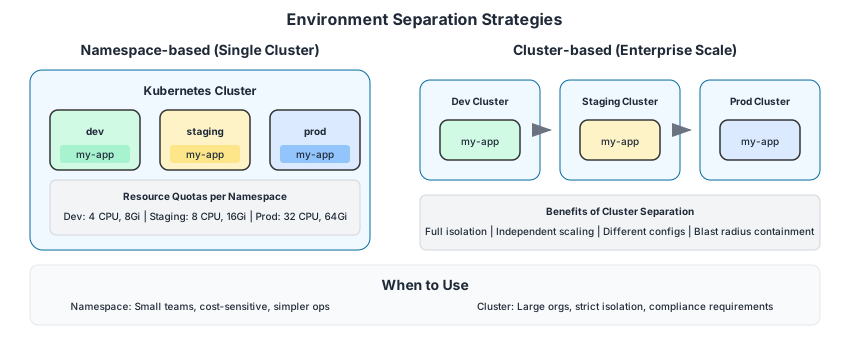
Resource Quotas per Environment
apiVersion: v1
kind: ResourceQuota
metadata:
  name: dev-quota
  namespace: development
spec:
  hard:
    requests.cpu: "4"
    requests.memory: 8Gi
    limits.cpu: "8"
    limits.memory: 16Gi
    pods: "20"
    services: "10"
---
apiVersion: v1
kind: ResourceQuota
metadata:
  name: prod-quota
  namespace: production
spec:
  hard:
    requests.cpu: "32"
    requests.memory: 64Gi
    limits.cpu: "64"
    limits.memory: 128Gi
    pods: "100"
    services: "50"
High Availability Patterns
High availability in Kubernetes is not automatic — it is designed. A three-replica Deployment means nothing if all three pods land on the same node and that node fails. The following patterns ensure that availability survives the failures that actually happen in production.
Pod Anti-Affinity
Spread pods across nodes and zones:
spec:
  affinity:
    podAntiAffinity:
      requiredDuringSchedulingIgnoredDuringExecution:
        - labelSelector:
            matchLabels:
              app: my-application
          topologyKey: kubernetes.io/hostname
      preferredDuringSchedulingIgnoredDuringExecution:
        - weight: 100
          podAffinityTerm:
            labelSelector:
              matchLabels:
                app: my-application
            topologyKey: topology.kubernetes.io/zone
Pod Disruption Budget
Ensure minimum availability during updates:
apiVersion: policy/v1
kind: PodDisruptionBudget
metadata:
  name: my-application-pdb
spec:
  minAvailable: 2    # Or use maxUnavailable: 1
  selector:
    matchLabels:
      app: my-application
Horizontal Pod Autoscaler
apiVersion: autoscaling/v2
kind: HorizontalPodAutoscaler
metadata:
  name: my-application-hpa
spec:
  scaleTargetRef:
    apiVersion: apps/v1
    kind: Deployment
    name: my-application
  minReplicas: 3
  maxReplicas: 20
  metrics:
    - type: Resource
      resource:
        name: cpu
        target:
          type: Utilization
          averageUtilization: 70
    - type: Resource
      resource:
        name: memory
        target:
          type: Utilization
          averageUtilization: 80
  behavior:
    scaleDown:
      stabilizationWindowSeconds: 300
      policies:
        - type: Percent
          value: 10
          periodSeconds: 60
Storage and Persistence
Storage Classes
apiVersion: storage.k8s.io/v1
kind: StorageClass
metadata:
  name: fast-ssd
provisioner: kubernetes.io/aws-ebs  # Or your provider
parameters:
  type: gp3
  iops: "3000"
  throughput: "125"
reclaimPolicy: Retain
volumeBindingMode: WaitForFirstConsumer
allowVolumeExpansion: true
Persistent Volume Claims
apiVersion: v1
kind: PersistentVolumeClaim
metadata:
  name: data-pvc
spec:
  accessModes:
    - ReadWriteOnce
  storageClassName: fast-ssd
  resources:
    requests:
      storage: 100Gi
StatefulSet for Databases
apiVersion: apps/v1
kind: StatefulSet
metadata:
  name: postgresql
spec:
  serviceName: postgresql
  replicas: 3
  selector:
    matchLabels:
      app: postgresql
  template:
    metadata:
      labels:
        app: postgresql
    spec:
      containers:
        - name: postgresql
          image: postgres:15
          ports:
            - containerPort: 5432
          volumeMounts:
            - name: data
              mountPath: /var/lib/postgresql/data
  volumeClaimTemplates:
    - metadata:
        name: data
      spec:
        accessModes: ["ReadWriteOnce"]
        storageClassName: fast-ssd
        resources:
          requests:
            storage: 50Gi
Networking and Ingress
Ingress Controller
apiVersion: networking.k8s.io/v1
kind: Ingress
metadata:
  name: my-application
  annotations:
    nginx.ingress.kubernetes.io/ssl-redirect: "true"
    nginx.ingress.kubernetes.io/proxy-body-size: "50m"
    cert-manager.io/cluster-issuer: letsencrypt-prod
spec:
  ingressClassName: nginx
  tls:
    - hosts:
        - app.example.com
      secretName: app-tls
  rules:
    - host: app.example.com
      http:
        paths:
          - path: /
            pathType: Prefix
            backend:
              service:
                name: my-application
                port:
                  number: 8080
Network Policies
apiVersion: networking.k8s.io/v1
kind: NetworkPolicy
metadata:
  name: my-application-policy
spec:
  podSelector:
    matchLabels:
      app: my-application
  policyTypes:
    - Ingress
    - Egress
  ingress:
    - from:
        - namespaceSelector:
            matchLabels:
              name: ingress-nginx
        - podSelector:
            matchLabels:
              app: frontend
      ports:
        - protocol: TCP
          port: 8080
  egress:
    - to:
        - podSelector:
            matchLabels:
              app: postgresql
      ports:
        - protocol: TCP
          port: 5432
    - to:
        - namespaceSelector: {}
          podSelector:
            matchLabels:
              k8s-app: kube-dns
      ports:
        - protocol: UDP
          port: 53
Monitoring and Observability
Prometheus Stack
helm repo add prometheus-community https://prometheus-community.github.io/helm-charts
helm install prometheus prometheus-community/kube-prometheus-stack \
  --namespace monitoring \
  --create-namespace \
  --set grafana.adminPassword=admin
ServiceMonitor for Application
apiVersion: monitoring.coreos.com/v1
kind: ServiceMonitor
metadata:
  name: my-application
  labels:
    release: prometheus
spec:
  selector:
    matchLabels:
      app: my-application
  endpoints:
    - port: http
      path: /metrics
      interval: 30s
Key Metrics Dashboard
| Metric | Description | Alert Threshold |
|---|---|---|
container_cpu_usage_seconds_total | CPU usage | > 80% for 5min |
container_memory_usage_bytes | Memory usage | > 85% of limit |
kube_pod_status_ready | Pod readiness | < desired replicas |
http_requests_total | Request count | Rate anomaly |
http_request_duration_seconds | Latency | p99 > 1s |
Security Best Practices
Pod Security Standards
apiVersion: v1
kind: Namespace
metadata:
  name: production
  labels:
    pod-security.kubernetes.io/enforce: restricted
    pod-security.kubernetes.io/audit: restricted
    pod-security.kubernetes.io/warn: restricted
Security Context
spec:
  securityContext:
    runAsNonRoot: true
    runAsUser: 1000
    fsGroup: 1000
    seccompProfile:
      type: RuntimeDefault
  containers:
    - name: app
      securityContext:
        allowPrivilegeEscalation: false
        readOnlyRootFilesystem: true
        capabilities:
          drop:
            - ALL
Secrets Management
# Using External Secrets Operator
helm repo add external-secrets https://charts.external-secrets.io
helm install external-secrets external-secrets/external-secrets
apiVersion: external-secrets.io/v1beta1
kind: ExternalSecret
metadata:
  name: my-application-secrets
spec:
  refreshInterval: 1h
  secretStoreRef:
    name: vault-backend
    kind: ClusterSecretStore
  target:
    name: my-application-secret
  data:
    - secretKey: database-password
      remoteRef:
        key: secret/my-app
        property: db_password
Final Thoughts
Kubernetes is simultaneously the best and worst thing to happen to infrastructure engineering. Best, because it provides a universal abstraction layer that works the same way on a developer’s laptop and in a multi-region production cluster. Worst, because that abstraction comes with a complexity tax that teams underestimate until they are three months into a migration and drowning in YAML.
Helm, ArgoCD, and the patterns described here do not eliminate that complexity — they manage it. Helm gives you parameterisation so you stop copying files. ArgoCD gives you reconciliation so you stop wondering what the cluster actually looks like. Pod anti-affinity, PDBs, and HPA give you resilience so you stop waking up at 3 AM. And proper observability gives you visibility so you can distinguish a genuine incident from a false alarm.
None of this is magic. It is discipline, encoded in configuration. The architecture scales from small teams to enterprise deployments, but only if you invest the time to understand the primitives before layering the abstractions. Start with Kubernetes fundamentals, earn your way to Helm, and adopt GitOps when — not before — you have the operational maturity to trust the reconciliation loop.
Kubernetes and Helm: Enterprise Deployment Architecture
A guide to production-ready container orchestration.
Achraf SOLTANI — July 20, 2024