
Push Notifications at Scale: Building an On-Premise Architecture
Push notifications look trivial from the outside — a title, a body, a tap. But behind that tap is a pipeline that must never lose a message, never duplicate one, and never take more than a few seconds from trigger to vibration. I learned this the hard way while designing the notification infrastructure for a banking application serving millions of customers. The constraints were unforgiving: strict data sovereignty meant the pipeline had to run on-premise, financial regulations demanded full auditability, and the business wanted both real-time transaction alerts and mass marketing campaigns flowing through the same system.
The Challenge
Building a push notification system at scale presents several challenges:
- Volume: Millions of devices, thousands of notifications per second
- Reliability: Financial notifications cannot be lost or duplicated
- Latency: Transaction alerts must arrive within seconds
- Compliance: Data must remain within controlled infrastructure
- Flexibility: Support for actionable notifications, rich media, and targeting
The goal was to design an architecture that could handle mass notifications (campaigns) while maintaining the responsiveness needed for transactional alerts.
Architecture Overview
The system follows an event-driven architecture with clear separation of concerns:
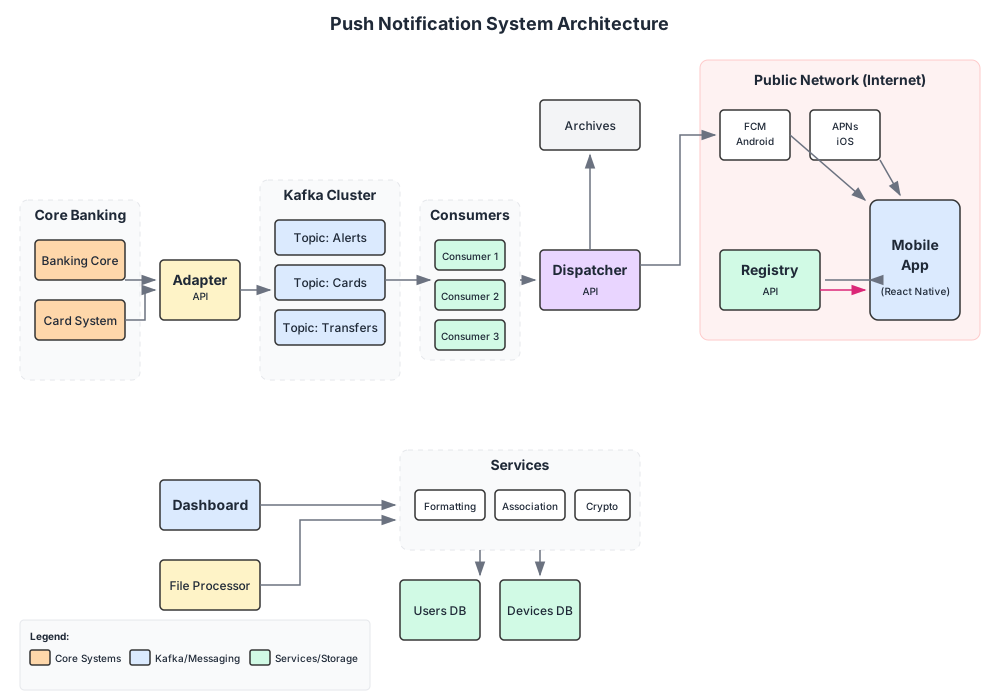
The system integrates with existing banking infrastructure through well-defined interfaces:
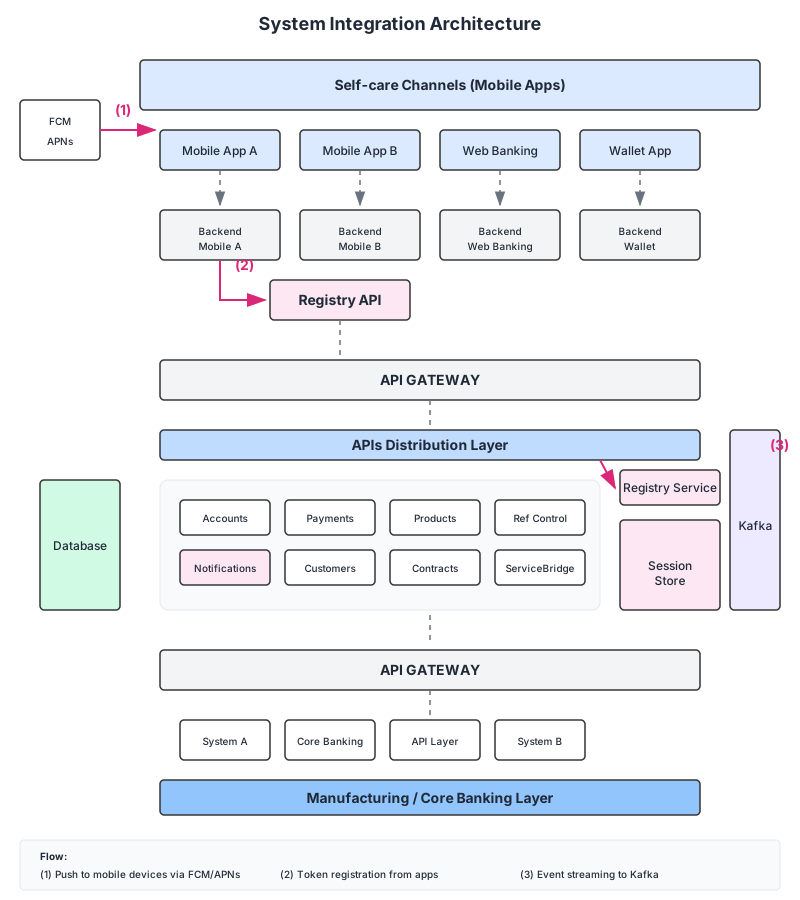
Component Breakdown
1. Registry Service
The registry handles device token management—the foundation of any push notification system. When a user installs the mobile app and grants notification permissions, the device token (provided by FCM or APNs) is registered with our service.
// Simplified token registration endpoint
type DeviceRegistration struct {
    UserID      string `json:"user_id"`
    Token       string `json:"token"`
    Platform    string `json:"platform"` // ios, android
    AppVersion  string `json:"app_version"`
    DeviceModel string `json:"device_model"`
}

func (s *RegistryService) Subscribe(reg DeviceRegistration) error {
    // Store in Redis with user lookup
    key := fmt.Sprintf("user:%s:tokens", reg.UserID)
    return s.redis.SAdd(ctx, key, reg.Token).Err()
}
2. Redis Cache
Redis serves dual purposes:
- Token storage: Fast O(1) lookups for user-to-token mappings
- Deduplication: Prevent duplicate notifications within time windows
- Rate limiting: Protect downstream services from overload
user:123456:tokens → {token_1, token_2, ...}  // User's devices
token:abc123:info → {platform, app_version}   // Token metadata
notif:hash:sent → TTL 5min                    // Deduplication
3. Kafka Message Queue
Kafka provides the backbone for reliable, ordered message delivery. Two key topics handle different notification patterns:
notifications.transactional  → partition by user_id (ordering guarantee)
notifications.broadcast      → partition by hash (parallelism)
For transactional notifications (account alerts, OTPs), ordering matters—a user shouldn’t receive a “transaction completed” before “transaction initiated”. Partitioning by user_id ensures all notifications for a user flow through the same partition, maintaining order.
For broadcast campaigns, we optimise for throughput by distributing across all partitions.
4. Dispatcher Workers
The dispatcher is a pool of workers consuming from Kafka and delivering to FCM/APNs:
type Dispatcher struct {
kafka *kafka.Consumer
fcm *fcm.Client
apns *apns.Client
registry *RegistryService
}
func (d *Dispatcher) ProcessMessage(msg kafka.Message) error {
var notif Notification
json.Unmarshal(msg.Value, ¬if)
// Fetch device tokens for target
tokens, err := d.registry.GetTokens(notif.UserID)
if err != nil {
return err
}
// Fan out to all user devices
for _, token := range tokens {
if token.Platform == "android" {
d.fcm.Send(token.Value, notif.ToFCM())
} else {
d.apns.Send(token.Value, notif.ToAPNs())
}
}
return nil
}
5. Dashboard & API

The dashboard provides operational visibility and campaign management:
- Real-time delivery metrics
- Campaign scheduling and targeting
- A/B testing for notification content
- Audit logs for compliance
Scaling Kafka Consumers
One of the most challenging aspects was scaling the dispatcher workers. Kafka’s consumer group model requires careful tuning.
The Problem
With millions of notifications during peak campaigns, a single consumer couldn’t keep up. But simply adding consumers has limitations—you can’t have more consumers than partitions.
The Solution
We implemented a tiered approach where each Kafka consumer spawns an internal worker pool. This provides:
- Partition-level ordering: Messages within a partition process sequentially
- Consumer-level parallelism: Multiple goroutines handle different partitions
- Backpressure: Worker pool size limits prevent memory exhaustion
func (d *Dispatcher) Run() {
    // Buffered channel for backpressure
    jobs := make(chan kafka.Message, 1000)

    // Worker pool
    for i := 0; i < 100; i++ {
        go func() {
            for msg := range jobs {
                d.ProcessMessage(msg)
            }
        }()
    }

    // Consumer loop
    for {
        msg, _ := d.kafka.ReadMessage(context.Background())
        jobs <- msg
    }
}
Actionable Notifications
Modern notifications aren’t just informational—they’re interactive. Banking apps benefit from actionable notifications that let users respond without opening the app:
{
  "title": "Acme Bank",
  "body": "You received a transfer of $5,300.00",
  "data": {
    "type": "transfer_received",
    "amount": 5300,
    "currency": "USD",
    "transaction_id": "TXN123456"
  },
  "actions": [
    {
      "id": "view_details",
      "title": "View Details",
      "foreground": true
    },
    {
      "id": "quick_transfer",
      "title": "Transfer",
      "foreground": true
    }
  ]
}
On the mobile side (React Native), handling these actions requires proper setup:
// React Native notification handler
import PushNotificationIOS from '@react-native-community/push-notification-ios';

PushNotificationIOS.setNotificationCategories([
  {
    id: 'TRANSFER_RECEIVED',
    actions: [
      { id: 'view_details', title: 'View Details', options: { foreground: true } },
      { id: 'quick_transfer', title: 'Transfer', options: { foreground: true } },
    ],
  },
]);

// Handle action response
PushNotificationIOS.addEventListener('localNotification', (notification) => {
  const action = notification.getActionIdentifier();
  const data = notification.getData();

  switch (action) {
    case 'view_details':
      navigation.navigate('TransactionDetail', { id: data.transaction_id });
      break;
    case 'quick_transfer':
      navigation.navigate('Transfer', { prefill: data });
      break;
  }
});
Delivery Guarantees
For financial notifications, reliability isn’t optional. The system implements several guarantees:
At-Least-Once Delivery
Kafka consumers commit offsets only after successful FCM/APNs delivery:
func (d *Dispatcher) ProcessWithRetry(msg kafka.Message) {
    for attempt := 0; attempt < 3; attempt++ {
        err := d.ProcessMessage(msg)
        if err == nil {
            d.kafka.CommitMessages(context.Background(), msg)
            return
        }
        time.Sleep(time.Second * time.Duration(attempt+1))
    }
    // Move to dead letter queue
    d.dlq.Send(msg)
}
Idempotency
Each notification carries a unique ID. The dispatcher checks Redis before sending:
func (d *Dispatcher) IsDuplicate(notifID string) bool {
    key := fmt.Sprintf("notif:%s:sent", notifID)
    set, _ := d.redis.SetNX(ctx, key, "1", 5*time.Minute).Result()
    return !set // If SetNX returns false, key existed = duplicate
}
Dead Letter Queue
Failed notifications after retries move to a DLQ for manual inspection and replay:
notifications.dlq → {original_message, error, timestamp, attempts}
Monitoring and Observability
Operating at scale requires visibility. Key metrics we track:
| Metric | Description | Alert Threshold |
|---|---|---|
notifications.sent.total | Total notifications sent | - |
notifications.failed.total | Failed deliveries | > 1% |
kafka.consumer.lag | Messages pending processing | > 10,000 |
fcm.latency.p99 | 99th percentile FCM response time | > 500ms |
dispatcher.worker.active | Active worker goroutines | < 50% capacity |
Grafana dashboards provide real-time visibility, while PagerDuty alerts on anomalies.
Lessons Learned
1. Token hygiene is critical
Invalid tokens accumulate. FCM returns specific error codes (UNREGISTERED, INVALID_ARGUMENT) that should trigger immediate token removal. We run daily cleanup jobs to purge stale tokens.
2. Partition count is a commitment
Changing Kafka partition count requires careful migration. We over-provisioned initially (24 partitions) to allow horizontal scaling without rebalancing pain.
3. Rate limiting saves relationships
FCM and APNs have rate limits. Hitting them degrades delivery for all notifications. Implement token bucket rate limiting at the dispatcher level.
4. Test with real scale
Synthetic load testing revealed bottlenecks we never anticipated. The jump from 100 to 100,000 notifications/second exposed Redis connection pool exhaustion, Kafka rebalancing storms, and goroutine leaks.
Conclusion
Building an on-premise push notification system for banking requires balancing reliability, performance, and compliance. The event-driven architecture with Kafka at its core provides the foundation for scalable, ordered message delivery.
The key insight: push notifications are deceptively simple on the surface but demand careful engineering at scale. Every component—from token management to consumer scaling to delivery guarantees—requires deliberate design decisions.
For banks and financial institutions with strict data sovereignty requirements, this architecture provides a path to owning the notification pipeline while leveraging FCM/APNs for the last-mile delivery that only platform vendors can provide.
Push Notifications at Scale: Building an On-Premise Architecture
A deep dive into event-driven notification systems for banking.
Achraf SOLTANI — April 15, 2024